
What scouts look for in a youth football player's video
What scouts look for in a youth football player's video: decisions, technique, effort and attitude, and how a parent can show them in a few minutes of match footage.
If you are wondering what scouts look for in a youth football player's video, the honest answer is: less than you think, and different from what you expect. Most advice on this comes from coaching sites and guides, not from official scouting rules, and every scout and club has their own taste. So treat what follows as common ground, not a guarantee.
This guide covers what scouts tend to watch for, what a video can and cannot show, and how to choose plays that show it. If you have not made a video yet, start with why your player needs a performance video, and how to make one.
What do scouts look for in a young player?
Guides such as FourFourTwo's piece on scouting and many coaching blogs repeat a similar list:
- Decisions. Does the player pick the right pass, run or moment to dribble? This is often called game sense or "game IQ".
- Technique. First touch, passing, striking, both feet. How the player handles the ball under pressure.
- Movement without the ball. Where the player stands, how they get free, how they react when the ball is lost.
- Effort and attitude. Does the player keep working after a mistake? Do they talk to teammates?
- Athletic potential. At young ages scouts are said to look for signs of potential, not a finished body.
A video can show the first four well. It cannot show the last one properly, and it cannot show character. That is why many scouts want to see the player live too. Think of the video as the reason to be invited to look, not the final verdict.
What should a youth player's video show?
Match footage, mostly. A skills clip in an empty garden shows technique, but it does not show decisions against opponents. Guides on highlight videos commonly advise that match action should be the main part, with at most a few skill clips added.
Choose plays that show different things:
- A good decision, even if nothing came of it. A simple pass that opens the game is worth more than a lucky shot.
- Technique under pressure: a first touch with an opponent close by.
- A defensive or off-the-ball moment: a recovery run, a tackle, a block, a good position.
- One or two plays where it went well and the result is clear: a goal, an assist, a save.
- Something that shows effort: pressing, tracking back.
Include a play where the player lost the ball and reacted well? Many parents skip this. It can be the most honest moment in the video, and it shows the attitude scouts say they care about. It is your choice, but do not cut every mistake. A video where nothing ever goes wrong looks edited.
For what each position should show, see our later guides. Until then: a defender is judged on defending, not on a lucky goal.
How do you make the player easy to find?
A scout who cannot tell which player is yours will stop watching. Make it obvious:
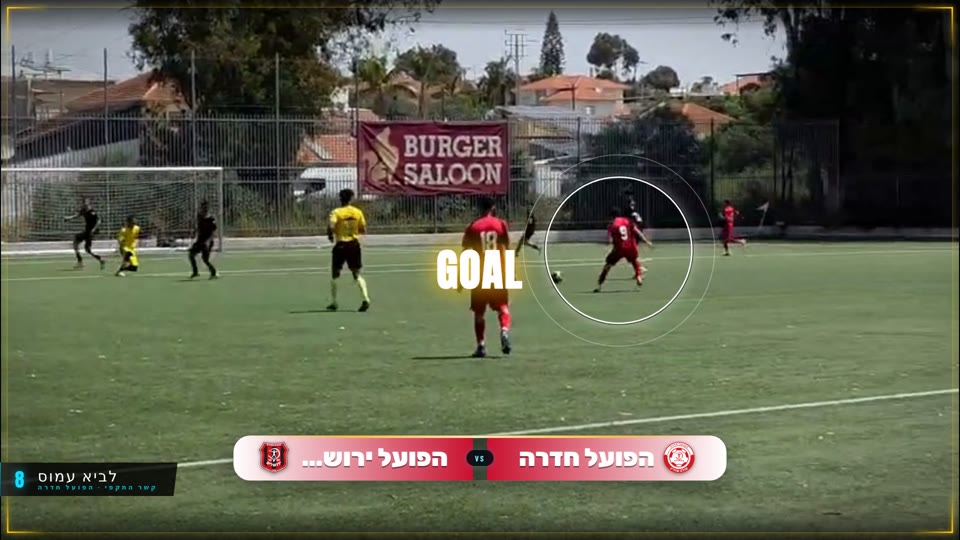
- Put the player's name, position, shirt number, shirt colour and age on the first screen.
- Mark the player in every play: a circle, an arrow or a highlight under the feet.
- Keep each play long enough to see the build-up, not only the finish.
- Use a clear view of the whole pitch when possible. Tight zoom hides the positioning and decisions that scouts want to see.
How long should the video be?
Short. Many recruiting guides for video suggest around three to five minutes at most, for older players. For a young player, shorter is safer, and the best plays should come first. We cover this in detail in a separate guide on how long a performance video should be.
How do you share it safely?
Your child is a minor. Share the link with people who need it, such as a coach or academy contact, rather than posting widely. Do not put home address, school or phone number in the video or its description. Think about who can comment and who can download. If a club asks for a contact, give a parent's email.
What can a parent do besides the video?
- Ask the current coach for honest feedback on strengths first. A scout will ask the same.
- Film more than one match so the plays are not from a single lucky day.
- Let the player watch their own video and say what they would change. Scouts like players who understand their own game.
- Keep the player's attitude on and off the pitch as good as the video suggests. Scouts also talk to coaches.
Which tools can you use?
You can make the video yourself. CapCut and iMovie are free or low cost and work on a phone. DaVinci Resolve is more powerful and takes longer to learn. Platforms such as Hudl are built for teams and clubs. You can also pay an editor.
KICKO is one more option. You upload the plays from one game, tap your player at the start of each play, fill a player card, pick music and watch a preview. After you pay once you get the performance video, plus three vertical reels for Instagram or TikTok from the same plays. It is built for parents who do not want to learn editing. If you enjoy editing, the free tools are fine.
Questions parents ask
Do scouts really watch videos?
Many do, as a first look before seeing a player live. How much weight a video has differs from club to club, and no one can promise a result from a video.
Should my child include skill tricks?
A few, if they are real. Match footage should be the main part, because it shows decisions against opponents.
Is a video enough to get a trial?
No video guarantees a trial. It helps people see the player when they cannot come to the match. Results, coach feedback and a live look still matter most.