
Why your player needs a performance video, and how to make one
What a performance video is, why coaches and scouts ask for it, what to put in it, and the tools that make it, from CapCut to KICKO.
A coach from another club calls. A trial is coming up. An academy asks you to "send something". Sooner or later every football parent hears the same question: do you have a video of him playing?
A performance video is the answer. It is a short film of your player's best moments from real matches, made so that someone who has never seen them play understands in a few minutes who they are on the pitch.
Why it matters
Coaches and scouts cannot come to every game. They see far more players than they can watch live, so video is how most of them decide who is worth a closer look. A clear video gets your player into that conversation. A long, shaky phone recording where nobody can tell which kid to watch usually does not.
A good video does three things:
- It shows what your player actually does well, not just goals.
- It makes your player easy to follow, every single play.
- It respects the viewer's time, so they watch to the end.
What to put in it
Open with your best. Many viewers decide in the first 30 seconds. Put your three strongest plays first, not in the order they happened.
Show the whole player. A defender's interceptions, a midfielder's turns and passes, a winger beating a man. Pick plays that show the position, not only the highlights everyone cheers for.
Mark your player. A circle, an arrow or a spotlight before each play. If the viewer has to search for your player, the play is wasted.
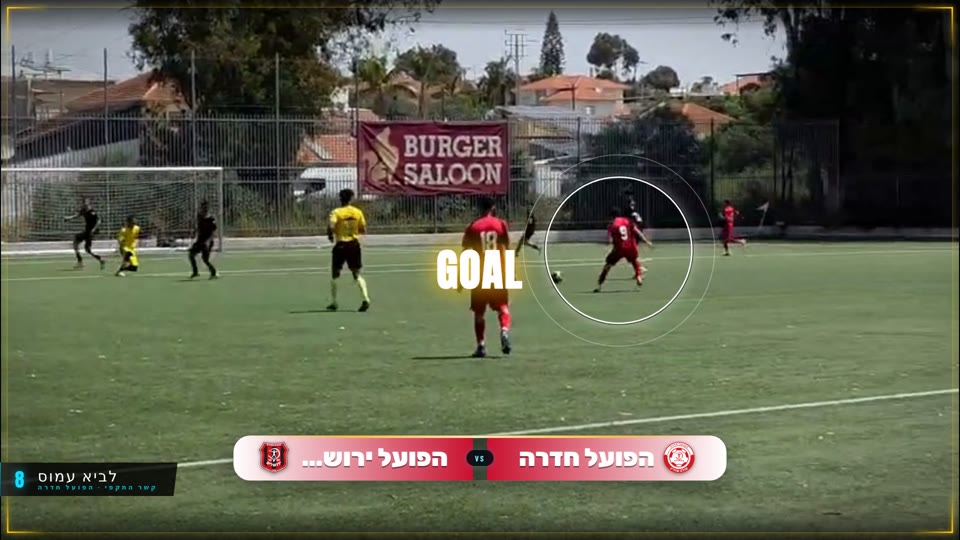
Keep it short. Three to five minutes is plenty. Twenty strong plays beat sixty average ones.
Add the details a coach needs. Name, year of birth, position, preferred foot, current club, and a way to reach you. Put them at the start and again at the end.
Use recent games. The last season tells a coach far more than a tournament from three years ago.
Which tool to use: a comparison
| Tool | Price | Time for one video | Editing skill needed | Marking the player | Built for football |
|---|---|---|---|---|---|
| CapCut | Free (paid Pro plan) | An evening or more | Medium | By hand (has motion tracking) | No |
| iMovie | Free, Apple devices only | An evening or more | Low | Almost none (text only) | No |
| DaVinci Resolve | Free (paid Studio version) | Many hours | High | By hand, advanced | No |
| A video editor | Paid | Several days | None | Yes | Depends on the editor |
| Hudl / Veo | Club subscription | Depends | Low | Some tools | Yes, with the club's footage |
| KICKO | One payment per video | Short, no editing | None | Tap the player in each play | Yes |
CapCut, iMovie or DaVinci Resolve suit a parent who enjoys editing and has the time. They export in full quality and can do everything. The cost is time: you go through the match footage, cut each play by hand, draw the marker, add titles, and export. Expect an evening or more for one video.
A video editor suits you if you want it done for you and the budget allows. The result can be excellent, but it costs more and usually takes days.
Hudl or Veo suit players whose club already films with them. You need access to the club's account and footage.
KICKO suits a parent who wants a professional result without learning to edit. You upload the plays from the game, tap your player at the start of each one, fill in the player card and pick the music. KICKO builds the video with the marker, the card and the titles. You watch a preview of the video, then pay.
Where to share it
- YouTube (public or unlisted) is still the easiest link to send to any coach.
- Instagram and TikTok reach people, but they want short vertical clips, not a five-minute film. Cut a few reels from the same plays. With KICKO, 3 vertical reels come with every video.
- WhatsApp and email are how most trial invitations actually start. A link travels better than a heavy file.
- A player page that collects the video, the plays and the details in one address is easier to send than five separate links.
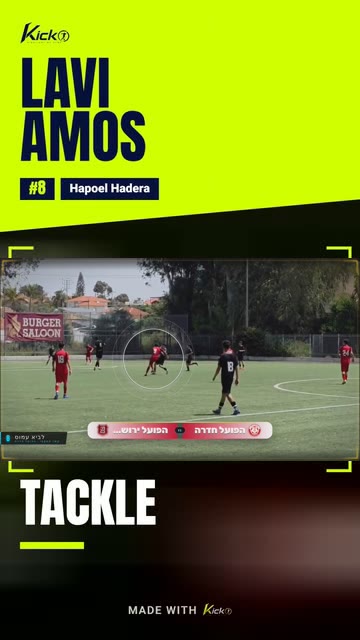
A quick checklist before you send
- Best plays in the first 30 seconds.
- Your player is marked in every play.
- Three to five minutes long.
- Name, birth year, position, club and contact at the start and the end.
- One link that works on a phone.
A performance video will not replace talent or hard work. What it does is make sure the right people actually get to see them.
Questions parents ask
How long should a performance video be?
Three to five minutes. Put the three best plays in the first 30 seconds, because many viewers decide there whether to keep watching.
Can I make a performance video for free?
Yes. CapCut, iMovie and DaVinci Resolve are free and good enough. The price is your time: cutting each play and marking the player by hand usually takes an evening or more.
Do I need the whole match, or only the plays?
Only the plays. Coaches want your player's best moments, clearly marked. If a coach asks for a full match later, send it as a separate link.